Microsoft Power Platform admin docs separate Microsoft 365 seeded Power Automate rights from Premium, Process, and RPA capacity. Seeded plans cover standard cloud connectors; premium connectors, unattended desktop, and AI Builder sit on paid paths that can block production.
Copilot Studio agent skills package a job’s instructions, scripts and templates into a zip another agent can run. A certificate PDF example shows creation via Skill Creator, upload, and why tests with missing fields reveal whether the skill asks or invents.
Microsoft shipped a Power Automate plugin for GitHub Copilot CLI and Claude Code. Makers can create, edit, run and debug cloud flows in natural language from the terminal, shortening the run-history debug loop while ownership and production controls still matter.
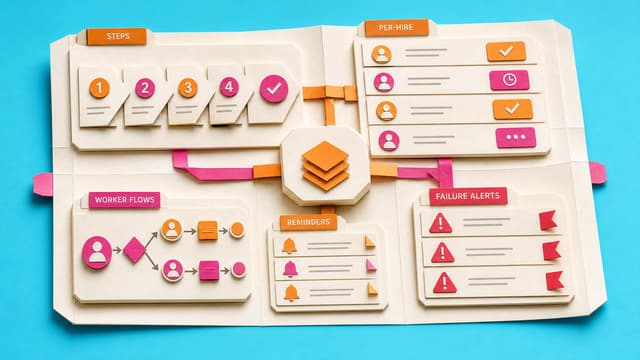
Three SharePoint lists, a starter onboarding template pack, five guarded Power Automate flows, and one completed fictional-hire proof for an HR or operations coordinator.
Who builds it? You build the app in the named platform, with AI coaching you through the work.
Before you start: A licence, permission to create apps, a safe test area, and sample data.
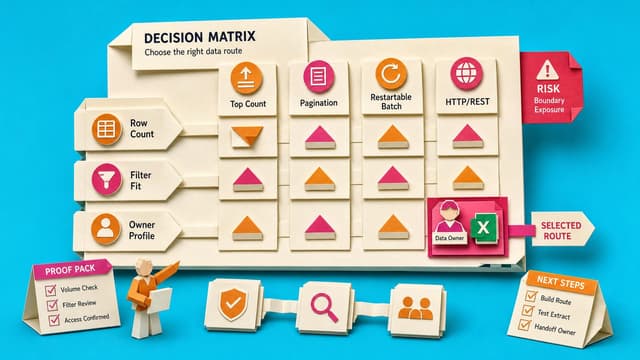
Power Automate Get items can finish green yet leave SharePoint rows behind. Defaults return 100 items; Top Count caps at 5,000; pagination follows performance-profile ceilings. Match the first test to the symptom before changing a live flow.
A coordinator records one known cloud flow per row in a SharePoint list, links each active row to a handover sheet, and adds two small cloud flows that remind the team to review old records and flag changes to the person responsible.
Who builds it? You can follow the guide and complete the setup yourself.
Before you start: Access to the tool, permission to change its setup, and sample data.
2021 Power Automate beginners face a new designer, Copilot and licence names in 2026. Core triggers, actions and conditions still hold. Update designer use, testing and sharing; verify Do Until limits, concurrency, connections and current tenant licensing before production.
Power Automate Get items often returns only part of a SharePoint list due to the 100-item default, Top Count, pagination settings or the 5000-item threshold. Flows run green while missing rows, so reports, migrations and updates stay incomplete until retrieval is proven.
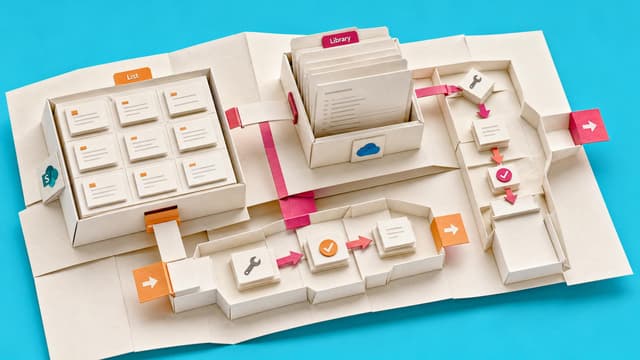
SharePoint with Power Automate supports contract storage, metadata and simple approvals. Negotiation, clause libraries, obligations and renewals often need dedicated CLM. This guide maps Microsoft 365 options to legal requirements and licensing constraints.
Copilot Studio workflows can call an agent via the Agent node for one judgement-heavy step, then reuse the response downstream. The public-preview feature runs in the user’s context; outputs need validation before irreversible actions.
SharePoint’s Button web part can launch a flow by Flow ID, but sharing, connection consent, and default-environment limits still decide whether site visitors can run it successfully.
Copilot Studio can generate an employee onboarding agent and multi-connector workflow from one prompt. Testing still found draft workflow references and broken natural-language date expressions that makers must fix before HR use.
Power Automate Copilot screens and options have shifted since 2024. Record with Copilot is deprecated, the New Designer is default, licensing changed, and desktop automation now routes through Copilot Studio Computer Use. Citizen makers need updated paths for the original four…
Finance teams using Power Automate approvals often lose visibility after a rejection. The decision is recorded but the source record, requester notification, and next action are not updated together, forcing status chasing and audit reconstruction.
Microsoft published a guide for resilient Power Automate flows. It covers non-personal ownership, connection references, error handling, retries, managed production solutions and monitoring so critical flows do not fail quietly when owners leave or connections break.
Microsoft deprecates the Power Automate mobile app for iOS and Android from 31 August 2026. Cloud flows still run, but the app, home-screen widget and mobile notifications lose support. Makers must replace notification-dependent paths before the deadline.
Power Automate makers cannot determine whether a connector, trigger, or sharing pattern will require premium licensing until after the flow is built. Connector tier, run context, user entitlements, and billing route are scattered across separate references, so the cost question…
Copilot Flow Safety Checklist for First-Run Sign-Off
Copilot-built Power Automate flows can send messages, update records, or trigger approvals. This checklist covers trigger, actions, dynamic content, connections, and test data to confirm the draft matches the intended process before first-run sign-off.
Members only
1 like·0 comments
Live 14th Sept 2026
Collab365 Team
Briefing·Last Update: 14th Sept 2026
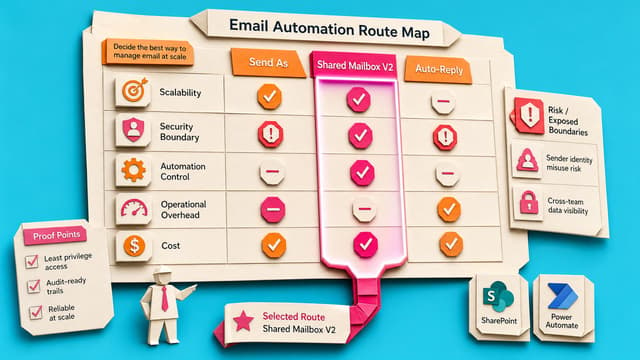
Choose Send As, Shared Mailbox V2, or Mailbox Auto-Reply
Power Automate can send mail successfully while still failing the business test if messages leave from the maker instead of HR, finance, or support. Send As, Shared Mailbox V2, and mailbox auto-reply differ on sender identity, reply routing, permissions, and Sent Items.
Public
1 like·0 comments
Live 14th Sept 2026
Collab365 Team
Blocker·Last Update: 14th Sept 2026
My automated emails come from me instead of the shared mailbox
Power Automate flows can succeed yet still send from the maker, not the shared mailbox. Wrong Outlook action or missing Send As permissions cause bad sender identity and Sent Items in the wrong place. Correct action and Exchange rights fix it.