What's Changed Since This Session
The landscape of Microsoft's security architecture has evolved drastically since the original 2023 session. The table below provides a factual summary of the core technology shifts, name changes, and deprecated features relevant to the current April 2026 operating environment.
| Technology Category | Status in April 2026 | What Replaced It |
|---|---|---|
| Security Portal Branding | Deprecated / Rebranded | Microsoft 365 Defender is now Microsoft Defender XDR. |
| Identity Management | Deprecated / Rebranded | Azure Active Directory (Azure AD) is now Microsoft Entra ID. |
| Apple Device Updates | Deprecated | Legacy Apple MDM software update policies end support with iOS/macOS 26.4 Replaced by Apple Declarative Device Management (DDM). |
| Windows Quality Updates | Legacy standard restarts phased out | Hotpatching via Windows Autopatch becomes the default starting May 2026.4 |
| Conditional Access Grants | Deprecated (March , 2026) | The 'Require approved client app' grant is retired. Replaced by 'Require app protection policy'.6 |
| Teams Integrations | Deprecated (March , 2026) | Office 365 Connectors in Teams are retired. Replaced by the Workflows app in Teams. |
| Exchange Authentication | Deprecated (Phase-out begins Oct 2026) | Exchange Web Services (EWS) begins admin-controlled disablement. Replaced by Microsoft Graph. |
| AI Security Assistance | General Availability / Public Preview | Standalone tools augmented by the Security Analyst Agent and Conditional Access Optimization Agent. |
How to Build This Today
1. Microsoft Entra MFA Tenant-Wide Deployment
The session showed you reviewing deployment steps to enable MFA tenant-wide in Microsoft Entra (formerly Azure AD) admin center to block up to 99% of account compromises. Here's how you'd build that same thing in April 2026.
The modern approach requires administrators to adapt to Microsoft's mandatory multifactor authentication enforcement policies. Microsoft currently enforces mandatory MFA in the public Azure cloud, making tenant-wide deployment a critical compliance requirement rather than an optional baseline. The rollout of this requirement represents a massive shift, as organizations can no longer rely on legacy password-only configurations without facing significant access disruptions.
Administrators can no longer rely solely on legacy authentication methods like basic SMS. The 2026 standard heavily emphasizes phishing-resistant credentials, such as Passkeys (FIDO2) and Certificate-Based Authentication (CBA). Microsoft has explicitly expanded support for these methods, recently introducing General Availability for(https://learn.microsoft.com/en-us/entra/fundamentals/whats-new) for authenticating with Phish-Resistant MFA credentials.
Deployment now begins entirely within the centralized Microsoft Entra admin center (entra.microsoft.com). This replaces the disparate legacy MFA settings portals used in previous years. A conceptual view of the modern Microsoft Entra admin center highlights a consolidated Authentication Methods policy screen. This UI features clear toggles for configuring advanced methods like FIDO2 security keys and the Microsoft Authenticator app, streamlining the shift away from legacy setups.
Navigate directly through Protection > Authentication methods > Policies to configure these settings. Administrators must select the target user groups and specify the allowed authentication methods from this single pane of glass.
Quick Win: The fastest way to secure users without deploying hardware tokens is scoping the Microsoft Authenticator app for passwordless phone sign-in. This method utilizes push notifications and biometrics, meeting high security standards while remaining highly deployable across the workforce.
Options within the policy menu include Microsoft Authenticator, FIDO2 security keys, and Software or Hardware OATH tokens. SMS verification remains available for specific edge cases, but it must be explicitly managed and scoped within the authentication policy to prevent widespread reliance on vulnerable telecom protocols.
When users register themselves for Microsoft Entra multifactor authentication, they can concurrently register for self-service password reset. This single-step registration reduces helpdesk overhead and improves the end-user onboarding experience.
Third-party MFA solutions can still be integrated directly with Microsoft Entra ID if an organization chooses not to use Microsoft's native authenticators. If an organization uses a federated identity provider, that external solution must be configured properly to send the multipleauthn claim to satisfy Entra ID MFA controls.
Organizations utilizing hybrid identity environments must account for critical synchronization changes approaching in 2026. Beginning June , 2026, Microsoft Entra ID actively blocks Entra Connect Sync or Cloud Sync from hard-matching new Active Directory user objects to existing cloud-managed users holding Entra roles. This critical security measure prevents malicious on-premises source-of-authority takeovers from compromising cloud administrators.
The synchronization service account itself is not affected by the mandatory MFA requirement, ensuring that automated directory syncs continue uninterrupted. However, administrators must ensure that any human accounts used for hybrid management are fully enrolled in phishing-resistant methods.
Prior to enforcing these policies tenant-wide, administrators are encouraged to test their configurations using the manual setup process for MFA. Review the(https://learn.microsoft.com/en-us/entra/identity/authentication/howto-mfa-getstarted) to ensure all prerequisite tasks are completed. This includes deploying the Microsoft Entra application proxy for legacy on-premises applications that require cloud access.
For organizations that require additional time to comply with mandatory Azure MFA, an option to postpone the enforcement start date is available. Global Administrators can navigate to the Azure portal to postpone the start date of enforcement for their specific tenant, provided they have elevated access.
2. Zero Trust Implementation via Conditional Access
The session showed you explaining Zero Trust implementation via continuous authentication and authorization (e.g., conditional access policies) for users inside/outside the network, trusting nothing by default. Here's how you'd build that same thing in April 2026.
Conditional Access remains the foundational Zero Trust policy engine for Microsoft Entra, but the configuration process is now heavily augmented by artificial intelligence. Policies dictate that if a user wants to access a resource, they must complete a specific action, operating strictly on the principles of explicit verification and least privilege.
The most significant 2026 update to this workflow is the introduction of the Conditional Access Optimization Agent, powered by Microsoft Security Copilot. This agent analyzes user behavior, network risk levels, and Microsoft best practices to automatically suggest new policies or adjustments to existing ones.
Administrators navigate to Microsoft Entra admin center > Entra ID > Conditional Access > Policies to review and manage these access rules. The Optimization Agent appears natively within this interface, actively guiding policy creation based on real-time organizational telemetry.
Quick Win: Leverage the Conditional Access Optimization Agent to automatically generate policies based on current tenant data. With one click, apply the AI-driven suggestion to automatically update or create a policy, bypassing the traditional manual drafting phase.
Network location signals have evolved significantly beyond simple IP whitelisting. Organizations now integrate Microsoft Entra Global Secure Access, which unifies identity and network access controls under a single policy engine. This integration requires creating a web content filtering policy and explicitly linking it to a Conditional Access policy.
To build this network-aware policy, navigate to Global Secure Access > Secure > Security profiles and select Create profile. Enter a descriptive name, select Link a policy, choose an existing web content filtering policy, and select Add.
Next, return to the Conditional Access portal to enforce this new profile. Create a new policy, target All internet resources with Global Secure Access, and select Session > Use Global Secure Access security profile to enforce the network boundary.
The system continuously monitors these access attempts utilizing advanced risk detection integration. If threat actors utilize AI to automate password attacks or launch sophisticated phishing attempts at scale, Entra Conditional Access adapts in real time to block access before damage occurs.
For private network resources, administrators must set up connector groups. Browse to Global Secure Access > Connect > Connectors, select New connector group, and use the dropdown menu to assign connectors for secure, per-app access.
Verify the installation of these connectors directly through the Windows Services Manager on the host server. Ensure that the Microsoft Entra private network connector and the Microsoft Entra private network connector updater services are currently running.
Standardizing policy nomenclature is a critical best practice in 2026 for maintaining a clean Zero Trust architecture. A descriptive naming standard, including sequence numbers, helps administrators quickly reference policies during troubleshooting calls (e.g., "CA01 - Require MFA for Admins").
Emergency access controls must be established simultaneously to prevent catastrophic lockouts. Administrators must create and document disabled "break-glass" policies that act as secondary resilient access controls during system outages or emergency scenarios.
Organizations should prioritize Conditional Access enforcement on their most-used applications first to ensure maximum coverage and risk reduction. Start with simple policies for device health enforcement, such as requiring device lock or password complexity, before deploying complex routing rules.
For a comprehensive architectural view of these networking features, administrators should consult the official(https://learn.microsoft.com/en-us/entra/architecture/gsa-poc-internet-access). Performing a Proof of Concept (PoC) for these features typically takes up to seven hours to configure prerequisites, traffic profiles, and private access settings.
3. Microsoft Defender XDR Configurations
The session showed you walking through Microsoft Defender portal configurations for XDR, endpoint detection/response, anti-malware, and endpoint protection. Here's how you'd build that same thing in April 2026.
The platform formerly known as Microsoft 365 Defender has been entirely consolidated and rebranded as Microsoft Defender XDR. This unified suite natively coordinates prevention, detection, and response across endpoints, identities, cloud apps, and email data, serving as the core of the modern Security Operations Center (SOC).
The Microsoft Defender portal (security.microsoft.com) features a modernized navigation structure designed for unified security operations. A notable UX change is that Microsoft Defender Experts for XDR is now a distinct, top-level entry in the navigation menu, providing predictable access to managed hunting services.
The configuration of traditional anti-malware components, such as scheduled antivirus scans, remains a vital baseline defense. Administrators configure these settings to run quick scans that meticulously inspect startup locations, registries, and mounted removable devices.
These scheduled scans complement the always-on, real-time protection engines. In most cases, a Quick Scan is sufficient and is the recommended option for scheduled scans, providing strong protection against kernel-level malware without heavily degrading system performance.
The true paradigm shift in 2026 is the deep integration of autonomous and assistive AI within the Defender portal. The Security Analyst Agent, launched in public preview in April 2026, fundamentally alters how endpoint detection and response (EDR) triage is performed by security analysts.
This agent performs deep, multi-step investigations across both Microsoft Defender XDR and Microsoft Sentinel telemetry. It reasons iteratively through large volumes of data without requiring the analyst to write a single complex Kusto Query Language (KQL) query.
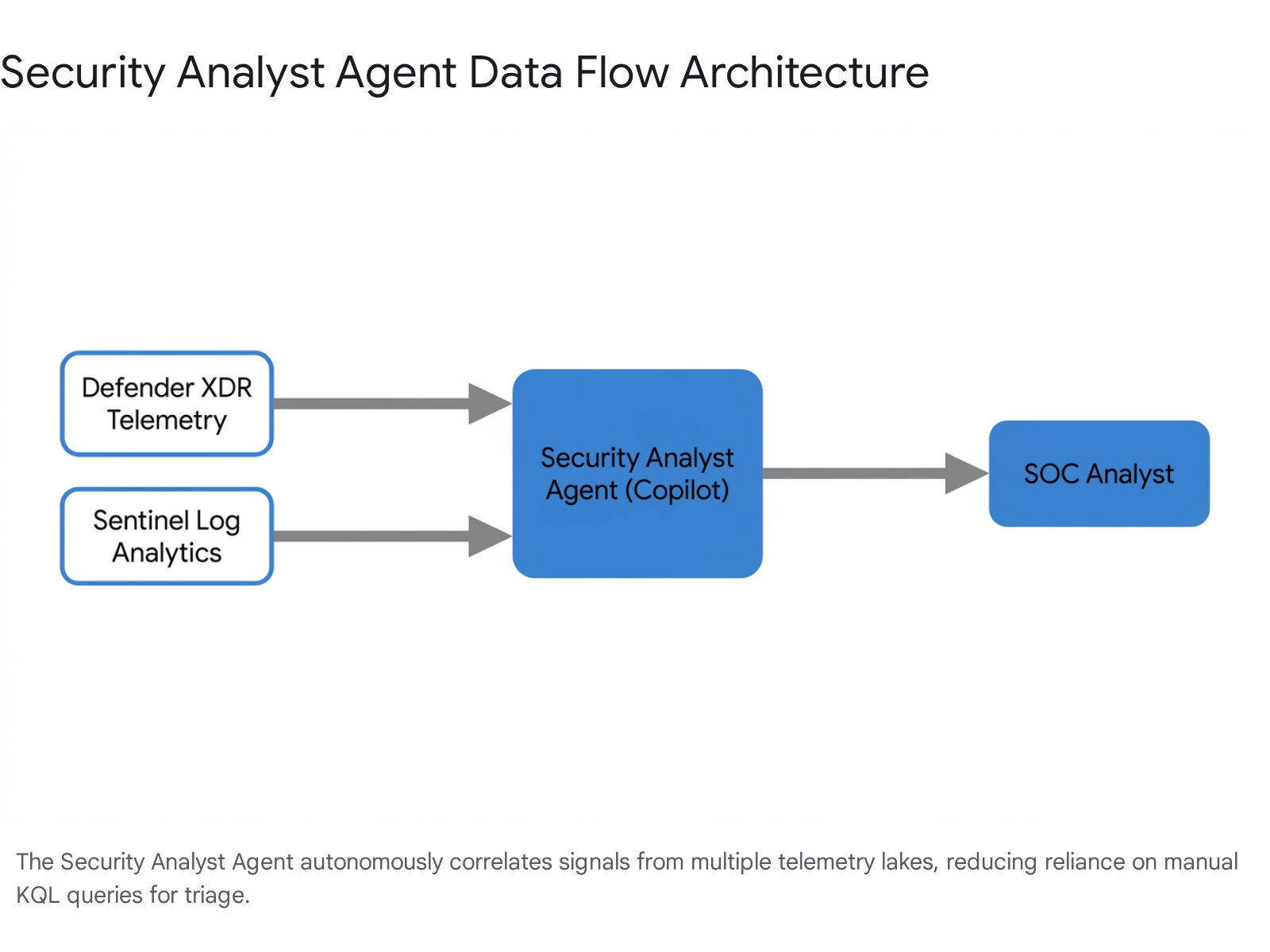
Quick Win: Deploy the Security Analyst Agent directly from the Security Store. This provides analysts with a chat interface to instantly uncover hidden risks, generate actionable insights, and visualize anomalies across massive endpoint and identity telemetry lakes.
To deploy this advanced capability, navigate to Security Copilot > Security Store within the Microsoft Defender portal. Administrators can browse for the agent, review specific setup instructions, and select Get agent to begin the provisioning process.
Visibility into rogue or unsanctioned AI tools is now a critical security metric for defenders. The Advanced Hunting experience now includes the newly structured AIAgentsInfo table.
This table allows defenders to query and monitor the operations of all AI agents operating within the Microsoft 365 environment. This expands visibility beyond Copilot Studio to include Microsoft Foundry, third-party marketplace agents, and custom line-of-business deployments.
For deeper analytics and cost control, analysts can now transform data using native filtering and splitting features before ingestion into the data lake. This native filtering helps reduce noise, control operational costs, and intelligently route data between analytics tiers.
Identity security enhancements within Defender XDR have also been expanded significantly. A new Identity Security dashboard provides summary cards for identity providers, on-premises identities, and non-human identities like service accounts.
When configuring Insider Risk Management, analysts gain access to enriched events through advanced hunting using KQL queries. This enables deeper investigation of potentially hidden risky patterns in user activity, with an expected rollout of further Graph API integrations beginning in June 2026.27
Detailed deployment guidance for these integrated capabilities can be found in the(https://learn.microsoft.com/en-us/defender-xdr/pilot-deploy-overview).
4. Data Protection in Microsoft Purview
The session showed you introducing data protection setups in Microsoft Purview (Information Protection) to prevent data exfiltration. Here's how you'd build that same thing in April 2026.
Data protection has fundamentally shifted from reactive, manual file labeling to proactive Data Security Posture Management (DSPM). Microsoft Purview now offers highly automated, authenticated setup guides directly within the Microsoft 365 admin center to streamline complex deployments.
The primary tool for this scenario is the Manage data exfiltration with Microsoft Purview setup guide. This automated wizard guides administrators through configuring Insider Risk Management policies and directly linking them to Data Loss Prevention (DLP) alerts.
The wizard highlights built-in tools that automatically map and streamline permission setups for Microsoft 365 groups. This significantly reduces manual configuration steps, mitigating human error and improving overall compliance efficiency.
Quick Win: Launch the "Manage data exfiltration" setup guide in the Microsoft 365 admin center. Using the authenticated experience utilizes automated workflows to instantly enable auditing and baseline sensitivity labeling across the entire digital estate.
The rapid proliferation of generative AI requires entirely new data boundaries to prevent corporate leakage. In 2026, Microsoft Purview DLP explicitly safeguards Copilot prompts and web queries.
Administrators must define strict policies that detect and restrict Microsoft 365 Copilot from responding to prompts or connecting to internal sources. This triggers if the query contains sensitive data, such as financial records, national IDs, or custom Sensitive Information Types (SITs).
Policy enforcement mechanisms have grown more nuanced to prevent end-user disruption and alert fatigue. Email notifications for browser and network DLP rules now utilize a rolling 10-minute batching window to prevent excessive emails when bulk activity is blocked.
Just-in-Time (JIT) protection is also a standard capability requiring configuration. Administrators deploy JIT protection to secure OneDrive shadow files that are not locally synced on an endpoint device, securing data even in highly transient states.
Data protection now extends deep into advanced analytics platforms. Microsoft Purview DLP policies can now be configured to prevent data leakage specifically for Fabric Warehouse and KQL/SQL databases.
For security investigations, the new Data Security Investigations workflow extracts personally identifiable information directly from selected data items. This allows investigators to quickly assess which personal data has been exposed during a security incident.
Security Copilot is deeply integrated into the Purview portal as well. Analysts utilize specific promptbooks to summarize complex alerts in DLP and Insider Risk Management, generating natural language summaries of policy matches.
To configure the information protection scanner for on-premises repositories, administrators must carefully manage sensitivity policies. When upgrading the scanner, ensure that the 'Enforce sensitivity labeling policy' is set to Off while keeping 'Label files based on content' set to On.
Administrators should review the updated Microsoft Purview Information Protection deployment documentation to properly map out phased deployments.
5. Endpoint Management in Microsoft Intune
The session showed you covering endpoint management in Intune for software/OS updates and compliance policies. Here's how you'd build that same thing in April 2026.
Endpoint management in Microsoft Intune has undergone a massive modernization effort, retiring several legacy protocols in favor of automated, declarative systems. Device compliance policies remain the cornerstone, requiring devices to meet specific rules—such as minimum OS versions or zero active threat levels—before Conditional Access grants network entry.
The most disruptive architectural change to Windows updates is the mandatory shift to Hotpatching via Windows Autopatch. Starting with the May 2026 Windows security update, hotpatch updates are enabled by default for all eligible managed devices.
Hotpatch updates deliver Monthly B release security fixes that install and take effect immediately without requiring a device restart. Because the hotpatch package size is significantly smaller than standard cumulative updates, it consumes less network bandwidth and drastically accelerates organizational compliance timelines.
Quick Win: Ensure your fleet is running Windows 11 version 24H2 or later to leverage the new default Hotpatching behavior. This allows organizations to reach 90% update compliance in half the standard time without interrupting employee workflows with forced reboots.
Organizations that are not ready for this aggressive transition must explicitly opt out. Administrators must navigate to the Intune admin center and apply a tenant-level Quality update policy to opt out of hotpatch updates; this critical control became available on April , 2026.4
Apple device management has fundamentally changed and requires immediate administrative action. Intune is officially ending support for legacy iOS/iPadOS and macOS software update policies due to Apple's deprecation of legacy commands in OS version 26.4
Administrators must now strictly utilize Apple's Declarative Device Management (DDM) model to manage the fleet. To target these modern devices, administrators must create assignment filters within Intune using the newly introduced isDDMManaged property.
DDM provides Intune with real-time app status and expanded configuration options, replacing the unreliable polling mechanisms of legacy MDM. To deploy required line-of-business (LOB) apps, admins must now explicitly change the management type to DDM in the App information section of the console.
The Apple Settings Catalog in Intune has been updated extensively with DDM-specific controls to govern new AI features. Administrators can now restrict or allow Apple Intelligence reporting, Genmoji, Image Playground, and specific on-device Siri dictation and translation features.
Android management has also seen legacy deprecations. Android device administrator (DA) management is deprecated and no longer available for devices with access to Google Mobile Services. Administrators must migrate fully to Android Enterprise profiles.
Feature update policies are essential for preventing premature OS upgrades. These policies lock devices to a specific Windows version (e.g., Windows 11 24H2), preventing devices from upgrading beyond the targeted release until IT has fully validated the new build.
For a complete breakdown of modern policy structures, administrators should refer to the(https://learn.microsoft.com/en-us/intune/device-updates/windows/) documentation.
Licensing Quick Reference
Deploying the complete 2026 security architecture requires specific, elevated licensing tiers. The table below outlines the prerequisites for the technologies and AI agents discussed in this guide.
| Technology Feature | Required License(s) | Notes |
|---|---|---|
| Conditional Access & Zero Trust | Microsoft Entra ID P1 or P2 19 | Included in M365 Business Premium. Necessary for device compliance enforcement. |
| Microsoft Security Copilot | Microsoft 365 E5 42 | M365 E5 includes 400 Security Compute Units (SCUs) per month for every 1000 users. |
| Security Analyst Agent | Security Compute Units (SCU) capacity 25 | Accessed via the Security Store. Usage costs are covered by the E5 SCU inclusion. |
| Windows Hotpatching | Windows 11 Enterprise E3/E5, Education A3/A5, M365 F3, or Business Premium 40 | Requires devices to be on version 24H2 or later and enrolled in Autopatch. |
| Microsoft Defender XDR | Microsoft 365 E5 or standalone Defender licenses 3 | Comprehensive suite covers Endpoints, Office 365, Identity, and Cloud Apps in one portal. |
| Microsoft Purview DSPM & DLP | Microsoft 365 E5 Compliance or M365 E5 44 | Required for advanced data security investigations and Copilot AI safeguard policies. |
Source note
Briefing published by Collab365 Spaces. Cite as "2026 Update: Secure Your Digital Workspace Companion Guide", Collab365 Spaces. 10 sources referenced.