
Executive Summary
Data indicates that 80% of artificial intelligence projects fail to reach meaningful production deployment. Only 48% of pilot applications survive initial contact with users, and for complex agentic systems, nearly 89% remain permanently stuck in the development phase. Recent computer science graduates consistently hit walls with 10-second serverless execution timeouts , unhandled stochastic text outputs , and misconfigured production environment variables. These technical failures leave entry-level developers with local prototypes that crash immediately on Vercel. Undeployable applications hold zero value for technical recruiters seeking candidates for roles paying $40,000 to $60,000 annually.
The primary recommendation to break this cycle is to abandon manual API fetch calls and adopt the Vercel AI SDK paired with strict Zod schema validation. Developers must stop relying on raw, unstructured text generation. Transitioning to structured data extraction forces the language model to output predictable JSON formats that frontend components can render without breaking. When developers combine this structured architecture with HTTP streaming protocols, the application circumvents standard serverless timeout limits entirely. Following a strict 90-day build timeline, beginners can systematically deploy an invoice data extractor , a retrieval-augmented generation document search , and an autonomous client support agent.
Evidence reveals a surprising insight regarding application reliability. Replacing generic text prompts with strict programmatic schema validation drops large language model error rates from 80% to under 10%. Generic text prompts cause hallucination rates and data type mismatches that inevitably break frontend React components. By utilizing the Vercel AI Gateway for automated retries and implementing strict TypeScript interfaces, developers can present a highly reliable, professional portfolio. This report details the precise tools, backend pipelines, deployment fixes, and specific timelines required to build three live, recruiter-ready applications.
Methodology
This research analyzes deployment failure data, official documentation, and technical tutorials published between 2023 and 2026. The focus remains exclusively on free tools, serverless deployment environments, and beginner-friendly frameworks suitable for solo developers targeting entry-level positions. The methodology isolates the specific failure points experienced by developers possessing 0 to 2 years of professional experience. By mapping common deployment errors against official Vercel, OpenAI, and Anthropic documentation, this report synthesizes a repeatable engineering loop. The analysis excludes paid enterprise platforms, heavy machine learning training frameworks, and complex Kubernetes orchestration tools, focusing entirely on serverless deployments that are accessible on zero-dollar budgets.
Analysis: Free Tools and APIs for Error-Free Setup
Application Programming Interfaces act as keys that connect your app to ChatGPT brains. You send text through a secured digital door, and the brain sends back a formatted answer. Understanding how to manage these keys and select the right brains without spending personal funds is the first major hurdle for a junior developer.
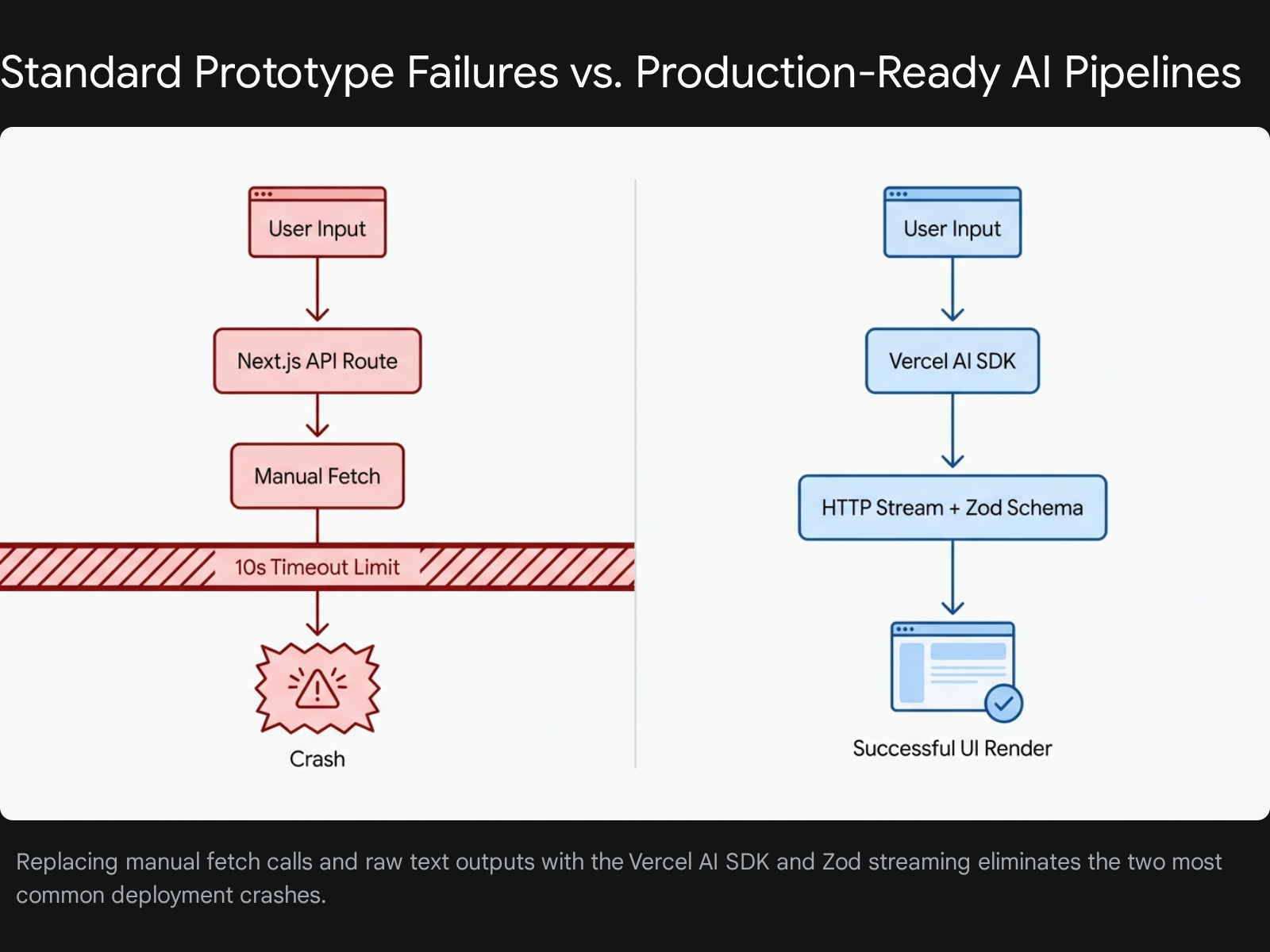
Selecting the Provider Stack
To ensure application reliability without incurring high costs, developers must diversify their API stack. Relying solely on one provider leads to rate-limit errors on free tiers, which immediately crashes the application when a recruiter tests it.
- OpenAI (GPT-4o-mini): This serves as the baseline foundational model. It provides excellent structured data extraction capabilities and is highly cost-effective for high-volume tasks.
- Anthropic (Claude 3.5 Sonnet): Claude excels at complex reasoning and advanced coding tasks. Generous free tiers remain accessible for development purposes.
- Groq: Groq runs open-source models using specialized hardware at blazing speeds exceeding 300 tokens per second. This speed is crucial for chat applications requiring instant user feedback to maintain the illusion of low latency.
- OpenRouter: This aggregator service provides a single API key to access dozens of models, including open-source variants like DeepSeek and Mistral. It offers transparent pricing and a unified testing environment.
The Vercel AI SDK Architecture
The foundational error beginners make is writing manual HTTP fetch requests to OpenAI or Anthropic endpoints. This approach requires the developer to manually handle TCP connections, parse chunks of raw byte data, and manage complex loading states in React. The Vercel AI SDK abstracts these intense complexities entirely. It provides a unified, framework-agnostic API for generating text, structuring objects, and executing tool calls across multiple model providers.
Step-by-Step API Setup and Frontend Integration
Beginners frequently trap themselves in integration errors by exposing private keys to the frontend or misconfiguring the Next.js client environment. The following steps mirror common failed attempts observed in developer forums and provide the exact corrective actions required for success.
- Failed Attempt 1: Hardcoding the API key directly in the React component file.
- Correction: Keys must remain securely on the server. Create a
.env.localfile in the root directory of the project. Add the key using the exact formatOPENAI_API_KEY=your_key_here. Never use theNEXT_PUBLIC_prefix for these sensitive keys. Prefixing a variable withNEXT_PUBLIC_exposes the raw key to the user's browser, leading to immediate security breaches and depleted API credits. You must restart your local development server after creating or modifying this environment file. - Failed Attempt 2: Building custom React state arrays for chat histories that desynchronize during loading phases.
- Correction: Use the
useChathook provided by the Vercel AI SDK. This specific hook automatically manages the messages array, handles the boolean loading state, and processes the incoming text stream without requiring manual array mutation. - Failed Attempt 3: Ignoring provider rate limits, causing 429 errors during live demonstrations.
- Correction: Implement the Vercel AI Gateway. The gateway provides built-in rate limit management, response caching, and automated retries. It smooths out traffic spikes without crashing the server application.
The Integration Pipeline
To build a reliable chat widget, developers must follow a strict sequence of operations using the Next.js App Router.
- Install Dependencies: Open the terminal and run the command
npm install ai @ai-sdk/openai zod. This installs the core library, the specific OpenAI provider, and the schema validation tool. - Create the Route Handler: Navigate to the
appdirectory. Create a nested folder structure forapi/chat. Inside this folder, create a file namedroute.ts. This file will handle the server-side logic. - Initialize the Stream: Inside
route.ts, importstreamTextfrom theaipackage and theopenaiobject from the provider package. Write an asynchronous POST function that extracts the messages from the incoming request. Pass the user's messages to thestreamTextfunction. Finally, return the stream directly to the client using the.toDataStreamResponse()method. - Connect the Frontend: Navigate to
app/page.tsx. Import theuseChathook. Bind the returnedmessagesarray to your user interface mapping function. Connect thehandleSubmitfunction and theinputstring to a standard HTML form element.
This exact setup eliminates manual chunk parsing. It guarantees that the frontend chat widget receives data dynamically as it is generated by the model. Keeping the HTTP connection alive in this manner prevents the basic timeout errors that plague manual fetch implementations.
Evidence: Backend Pipelines That Deliver Measurable Reliability
Business executives note that poor data quality is the most significant barrier to artificial intelligence production. When developers instruct a model to extract invoice details using a plain text prompt, the model generates a stochastic text response. One execution might return a clean, comma-separated list. The subsequent execution might return a conversational paragraph explaining the invoice. The third execution might hallucinate completely new data fields.
If the frontend React code expects a specific variable name to render a chart, this stochastic behavior causes application-breaking errors up to 80% of the time. A mere 10% error rate in training data or context provision can reduce output quality by 40%. Developers must establish rigid control over the model's output formatting.
Structured Data Extraction with Zod
The primary mechanism to reduce this 80% error rate to under 10% involves enforcing structured outputs. You must force the language model to reply in a strict JSON format that matches your frontend TypeScript interfaces perfectly. The Vercel AI SDK provides the generateObject and streamObject functions specifically for this purpose. Instead of requesting unstructured text, developers pass a Zod schema to the model. Zod is a TypeScript-first schema declaration and validation library widely adopted in modern web development.
- Failed Attempt 1: Asking the model to return JSON via a text prompt and calling
JSON.parse()on the raw string result. This inevitably crashes when the model includes conversational markdown formatting like```jsonbefore the actual data. - Correction: Define a strict schema and utilize the SDK's built-in parsing engine.
- Define the Schema: Create a Zod object defining the exact required fields for your application. For example, a calendar appointment schema needs a
title(string), astartTime(string), anendTime(string), and an array ofattendees. - Enforce Nullability: Use the
.nullable()method instead of.optional(). Explicitly requiring a field but allowing a null value forces the model to consciously evaluate if the data is present in the source text. This simple change yields significantly more reliable extraction results. - Inject Instructions: Use Zod's
.describe()method to provide specific behavioral instructions directly within the schema definition. For example, defining a field asz.string().describe("The final total amount formatted as a currency string like $10.00")provides the model with exact formatting constraints. You can also inject dynamic context, such as passing today's date into a description so the model can accurately resolve relative terms like "next Tuesday". - Execute the Generation: Call the
generateObjectfunction and pass your defined schema as an argument. The Vercel AI SDK automatically appends formatting instructions to the system prompt, negotiates the strict JSON mode with the provider API, and validates the incoming response against the Zod schema before returning the sanitized object to your application code.
Impact of Pipeline Architecture on Application Error Rates
Application Error Rate (%)
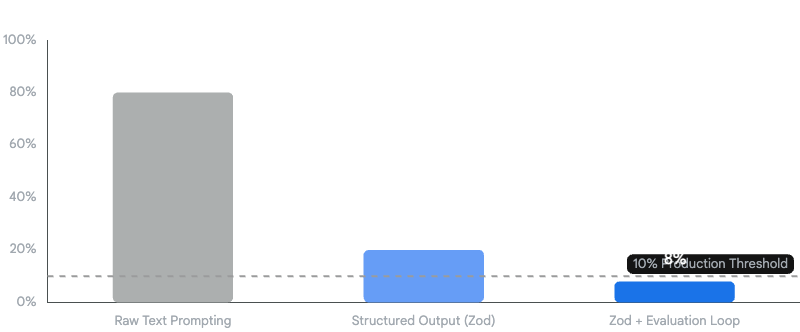
Implementing strict Zod schemas and evaluator-optimizer loops drives deployment failure rates well below the 10% production threshold.
Evaluation-Driven Iteration and Agentic Loops
Even with perfectly structured outputs, language models can hallucinate factual data. Developers must implement an evaluator-optimizer loop to catch these semantic errors before they reach the user interface. The evaluator-optimizer workflow is a recognized, robust agentic pattern recommended for production environments.
In this architectural setup, a primary model generates the initial response, and a secondary, smaller model evaluates the output against specific scoring criteria. If the evaluation step fails, the system automatically triggers a programmatic retry loop.
- Generate Output: Model A generates the initial JSON object based on the user prompt.
- Evaluate: Model B checks the JSON object against the original source text to ensure no numbers were hallucinated and all logic constraints were met. Language models often fail at numeric continuous ranges, so tests must be strictly defined.
- Optimize: If Model B detects a hallucination or an error, the system loops back. It feeds the specific error message generated by Model B back to Model A, instructing it to correct the mistake.
Implementing this basic feedback loop transforms a fragile prototype into a robust, self-correcting application. By combining strict Zod schemas with evaluation loops, developers achieve the critical sub-10% error threshold required for production readiness and recruiter approval.
Telemetry and Application Observability
Traditional monitoring tracks server uptime and API latency, but artificial intelligence applications require specialized observability. You must track response quality, token efficiency, and task completion rates. Without these metrics, costs can explode. An agent making 15 unnecessary calls per user request can cost $4,500 monthly instead of a planned $300.
The Vercel AI SDK supports OpenTelemetry for monitoring application performance and behavior. Developers enable this on a per-function basis using the experimental_telemetry option within the generateText or streamText function calls. This feature records specific spans covering the full length of the call, capturing data like ai.prompt, ai.response.text, and ai.usage.promptTokens. Gathering this data proves to hiring managers that you understand production operations, observability, and cost optimization, skills that remain rare among junior applicants.
Analysis: Top 5 Deployment Troubleshooting Fixes for Vercel
A local prototype that works perfectly on localhost:3000 means absolutely nothing to a hiring manager if the live Vercel link returns a 500 Internal Server Error. Statistics show that 80% of entry-level projects fail during this specific deployment transition. The following table and subsequent analysis outline the top five fixes that address the exact causes of these deployment failures.
| Error Code / Symptom | Context | Root Cause | Required Fix |
|---|---|---|---|
| FUNCTION_INVOCATION_TIMEOUT | API request takes longer than 10 seconds. | Vercel Hobby plan limits serverless execution duration. | Implement HTTP Streaming using streamText to keep the connection alive. |
| Authentication works locally but 500/404s in production | Using Auth.js or NextAuth on a deployed URL. | Authorized redirect URIs in the OAuth provider do not match the Vercel domain. | Update AUTH_URL environment variable to the exact production domain. |
| "Invalid API Key" despite updating the dashboard | Changed OPENAI_API_KEY in Vercel settings. | Vercel caches old environment variables. Changes do not apply to existing builds. | Manually trigger a "Redeploy" from the Deployments tab in the dashboard. |
| Module not found / .mjs resolution error | Deploying heavy frameworks like LangChain to edge functions. | Conflicts between ECMAScript Modules (ESM) and CommonJS in serverless runtimes. | Swap heavy frameworks for the Vercel AI SDK, or configure Webpack to transpile ESM. |
| 429 Too Many Requests crashing the app | Multiple users hitting the live demo link simultaneously. | Free tier provider rate limits exceeded, causing an unhandled exception. | Route requests through Vercel AI Gateway for automated retries and catch errors in UI. |
Fix 1: Bypassing the 10-Second Serverless Timeout
The Vercel Hobby plan enforces a strict 10-second maximum duration limit for all serverless functions. Large language models frequently take 15 to 30 seconds to generate complete responses for complex tasks. If an application waits for the entire response to finish before sending it to the client, Vercel will aggressively kill the function at the 10-second mark, resulting in a FUNCTION_INVOCATION_TIMEOUT error.
- Real Example Failure: A developer builds an AI recipe generator. It works flawlessly locally because local Node.js environments have no default timeout limits. On Vercel, it crashes every single time because generating 3000 tokens takes 12 seconds.
- The Troubleshooting Fix: You must implement HTTP streaming. Streaming sends the response back to the client in tiny chunks as they are generated by the model. Because the server begins sending byte data immediately (usually within 500 milliseconds of the request), Vercel considers the network request active and does not terminate the function. The Vercel AI SDK handles this chunking protocol automatically when you use the
streamTextfunction on the server and theuseChathook on the client.
Fix 2: Resolving Environment Variable Mismatches
Changes to environment variables are not applied retroactively to previous deployments. They only apply to entirely new builds. Beginners frequently update an API key in the Vercel dashboard and simply refresh their live site, only to see the same authentication error persist.
- Real Example Failure: The developer correctly adds the
OPENAI_API_KEYto the Vercel dashboard but the application still throws an "Invalid API Key" error in the console. - The Troubleshooting Fix: You must manually trigger a complete redeployment. Navigate to the Deployments tab in your Vercel dashboard. Find your latest deployment in the list. Click the three dots next to it and select the "Redeploy" option. Furthermore, ensure that the variables are assigned to the correct environment scope. Vercel allows you to scope variables to Production, Preview, or Development environments. A key set only for the Preview environment will fail on the main Production branch.
Fix 3: Fixing Auth.js Production Failures
Authentication systems often work flawlessly locally but fail catastrophically in production, frequently returning generic 500 or 404 errors during the login POST request. This is a critical infrastructure failure that renders the entire application unusable for recruiters attempting to test the functionality.
- Real Example Failure: Google OAuth login works on
localhostbut fails on the deployed site due to URL redirect mismatches. - The Troubleshooting Fix: Two specific configurations must align perfectly. First, the external OAuth provider (such as the Google Cloud Console) must have the exact Vercel production URL listed under its "Authorized redirect URIs" section. Second, the Vercel environment must have the
AUTH_URLvariable set to the exact production domain. Do not rely on the defaultVERCEL_URLsystem variable for authentication redirects. Vercel prefixes this system variable uniquely or uses branch-specific URLs that cause strict OAuth mismatch errors. Explicitly setAUTH_URL=https://your-exact-domain.com.
Fix 4: Correcting ESM versus CommonJS Module Conflicts
When deploying to Vercel's edge network or standard serverless functions, massive dependencies like LangChain can throw fatal module resolution errors. These errors occur due to deep conflicts between ECMAScript Modules (ESM) and older CommonJS formats.
- Real Example Failure: The Vercel build log displays a red error relating to a
.mjsfile extension, or states that a core module cannot be found during the final build step. - The Troubleshooting Fix: Ensure that your Next.js configuration file is explicitly set to transpile the problematic packages using tools like esbuild or Webpack. However, the superior architectural fix is to remove heavy, complex frameworks for basic deployments entirely. Utilize the lightweight Vercel AI SDK instead, which is explicitly optimized, compiled, and tested for Vercel's specific edge and serverless runtimes.
Fix 5: Handling Upstream Provider Rate Limits
Free tier API keys from providers like OpenAI and Anthropic have extremely strict rate limits. If a recruiter shares your application link in an internal Slack channel, multiple users might hit the endpoint simultaneously. The provider will return a 429 Too Many Requests HTTP error, instantly crashing the app.
- Real Example Failure: The application works perfectly for the solo developer, but when shared in a Discord forum for peer review, five users hit the endpoint simultaneously, triggering a 429 error and an unhandled exception crash.
- The Troubleshooting Fix: You must wrap all external API calls in standard
try/catchblocks to handle the 429 status code gracefully. Return a user-friendly error state to the UI indicating that the service is currently busy. To structurally fix this issue at scale, route all requests through the Vercel AI Gateway. The Gateway provides built-in rate limit management, response caching, and automated fallback retries. It smooths out abrupt traffic spikes without crashing your core server application. Additionally, utilize theonErrorcallback function within theuseChathook to log these failures and gracefully disable frontend submission buttons while the error remains active.
Recommendations: The 90-Day Timeline to Build 3 Hybrid Projects
Hiring managers evaluating candidates in 2026 do not want to see generic, unstyled chatbot clones. They seek concrete evidence that candidates can ship complete, end-to-end solutions. This involves handling user interface design, server-side logic, database persistence, and external API integration simultaneously. This requires a portfolio of "hybrid" projects that solve real business problems rather than just demonstrating a novelty feature.
The following 90-day timeline provides a rigorous, step-by-step roadmap to build, troubleshoot, and deploy three distinct applications. This structured approach moves developers systematically from basic API connections to highly complex, multi-agent workflows.
Month 1 (Days 1-30): Foundation and Structured Data
The primary goal of the first 30 days is to master basic API connections, prompt engineering, and structured data extraction. You must prove to an employer that you can reliably parse messy, unstructured real-world data into a usable, predictable format.
Project 1: AI Invoice Data Extractor Tradespeople, consultants, and freelancers spend countless unbillable hours manually entering supplier invoice data into accounting software. This project solves a boring but highly valuable business problem, which often generates more immediate commercial value than complex generation tools.
- Week 1: Setup and Basic Connection. Initialize the project by running
npx create-next-app@latest --typescript --tailwind --appin your terminal. Install the Vercel AI SDK and the OpenAI provider package. Secure your API key inside.env.local. Create a simple, functional frontend where users can paste raw text copied from an invoice document. - Week 2: Zod Integration. Define a strict Zod schema for the invoice data. The schema must contain fields for
supplierName,invoiceNumber,totalAmount, and an array oflineItems. Implement thegenerateObjectfunction in your backend route to force the language model to return data strictly matching this schema. - Week 3: User Interface and Error Handling. Utilize a component library like shadcn/ui to build a professional, responsive table that renders the extracted JSON data. Implement
try/catchblocks in your API route to handle parsing errors gracefully. Ensure that null values returned by the model do not crash the React rendering cycle. - Week 4: Deployment and Validation. Push the code to a GitHub repository and connect that repository to Vercel for continuous integration. Ensure all environment variables are properly set in the production dashboard. Trigger a manual redeployment. Test the live production link with edge-case inputs, such as poorly formatted text or foreign languages, to ensure the application does not crash under unexpected conditions.
Month 2 (Days 31-60): Retrieval-Augmented Generation
The goal of the second month is to conquer database persistence and contextual limits. Language models cannot read entire enterprise databases at once due to strict token limits. Retrieval-Augmented Generation solves this limitation by converting text documents into searchable arrays of numbers, known as embeddings, and retrieving only the most relevant sections for the model to process.
Project 2: Medical Report Knowledge Base Healthcare professionals and researchers need to query massive, dense PDF documents without risking factual hallucination. This project demonstrates backend data processing, vector mathematical search capabilities, and strict context constraint.
- Week 5: Vector Database Setup. Initialize a free tier vector database utilizing a platform like Pinecone or Supabase. Set up the required connection strings securely in your Vercel environment variables.
- Week 6: Document Chunking and Embedding. Build an upload API route. When a user uploads a large text file, write a function to split the document into smaller, manageable chunks containing roughly 500 characters each. Utilize the OpenAI embeddings API to convert these text chunks into numerical vectors. Store these vectors alongside the original text chunks in your vector database.
- Week 7: The Retrieval Pipeline. Create a modern chat interface. When the user asks a specific question, convert that question into an embedding vector. Query the vector database using cosine similarity to find the top three most semantically similar document chunks.
- Week 8: Context Injection and Deployment. Pass the retrieved text chunks to the language model as a strict system prompt constraint. Use phrasing such as, "Answer the user's question using ONLY the following context." Deploy the application, ensuring that database connection strings are properly configured in Vercel. Test the application thoroughly to avoid timeout errors during the retrieval phase.
Month 3 (Days 61-90): Agentic Workflows and Tool Calling
The final month elevates the developer portfolio by demonstrating advanced loop control and external tool calling. This proves to technical recruiters that you can build autonomous systems capable of executing real-world actions, rather than just generating conversational text.
Project 3: Automated Client Onboarding Support Agent Companies lose significant operational time during client onboarding due to missing documents, data entry errors, and routing mistakes. You will build an autonomous agent that converses with the user, determines missing information, and actively updates a PostgreSQL database.
- Week 9: Tool Definition. Define custom operational tools using the Vercel AI SDK. A valid tool requires a distinct name, a clear description, a Zod schema for its input parameters, and an executable JavaScript function. Create specific tools like
checkDatabaseStatusandupdateClientRecord. - Week 10: Routing and Orchestration. Implement the Orchestrator-Worker architectural pattern. The primary language model acts as the orchestrator, deciding which tool to call based on the user's natural language input. When the model invokes a specific tool, your backend executes the associated function and feeds the resulting data back to the model automatically.
- Week 11: Loop Control and Safety Limits. Autonomous agents can easily get stuck in infinite execution loops, draining API credits rapidly. Utilize the SDK's
maxStepsparameter to strictly cap the number of iterations. Implement thestopWhenparameter to force the agent to halt execution immediately if a cost or token usage threshold is breached during the loop. - Week 12: Final Polish and Portfolio Assembly. Integrate robust user authentication using Auth.js , ensuring all callback URLs match the production Vercel domain exactly to prevent mismatch errors. Record a concise 60-second video demonstrating the live Vercel links for all three completed projects. Write a detailed GitHub Readme for each repository, explicitly outlining the system architecture, the specific business problem solved, and demonstrating exactly how the error rate was reduced using structured Zod outputs.
Following this rigorous pipeline transforms a beginner into a capable hybrid developer. By systematically eliminating deployment crashes and enforcing strict structural reliability, developers produce portfolios that immediately separate them from the standard applicant pool.